

Database Relationships in SQL
What Are Database Relationships?
In a relational database, data is stored across multiple tables. Instead of keeping all data in one large table, we split it into smaller, related tables to:
- Reduce redundancy (No need to repeat data)
- Improve efficiency (Faster queries, better structure)
- Maintain consistency (Data updates in one place) To connect these tables, we use relationships between them, usually defined by Primary Keys and Foreign Keys.
Cardinality and ordinality
- Cardinality tells us the maximum number of times one record can be linked to another.
- Ordinality shows the minimum number of required connections.
These relationships are shown using different line styles and symbols to visually represent how pieces of data are connected in a database.
- One ( | ) → Each record must be linked to exactly one record.
- Many ( ⫶< ) → A record can be linked to multiple records.
- One and only one ( || ) → Each record must have exactly one match, no more, no less.
- Zero or one ( O| ) → A record may have one match, or none at all.
- One or many ( |< ) → A record must have at least one match, but can have many.
- Zero or many ( O< ) → A record can have many matches or none at all.
Understadning Primary and Foreign Keys
In a database, a Primary Key and Foreign Key help organize data and create relationships between tables.'
What is a
Primary Key (PK) ?
A Primary key is a unique identifier for each row in a table.
- Each table must have one.
- The value is unique and cannot be empty
- Helps find records quickly.
Example: In a Students table, StudentID is the Primary Key because every student has a unique ID.
What is a
Foreign Key (FK) ?
A Foreign Key connects one table to another by referencing a Primary Key in a different table.
- It links related data across tables.
- Ensures data consistency (you can't have an exam without a student).
- Prevents invalid data entries.
Example: In an Exams table, StudentID is a Foreign Key because it refers to a student in the Students table.
Illustration of the Data
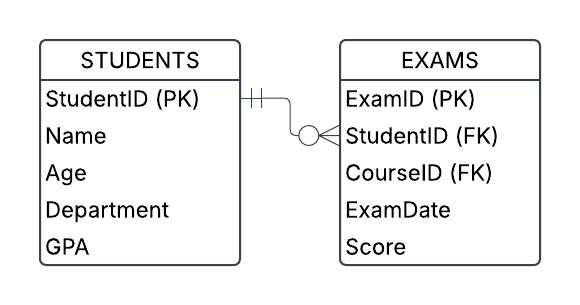
This diagram represents the relationship between STUDENTS and EXAMS in a database.
Breakdown of the Tables
STUDENTS Table
StudentID (PK): Unique identifier for each student.Name, Age, Department, GPA: Additional details about each student.
EXAMS Table
ExamID (PK): Unique identifier for each exam attempt.StudentID (FK): References the StudentID from the STUDENTS table.CourseID (FK): Links the exam to a specific course.ExamDate, Score: Records the exam details.
Relationship Explained
Each student can have zero ( O ) or many exams ( ⫶< ) , but each exam belongs to one student ( || ).
- One student can take multiple exams (but might not have taken any yet).
- Each exam entry must be linked to one student who took it.
Up Next: Practice INNER JOIN
Contact
Donate
About
Privacy Policy
Changelog